Tinydo
EN
Get the app

Stuck is not lazy.

Tinydo: an ADHD planner and focus app for iPhone and iPad

Tell Tiny what you can’t start. Tinydo breaks it into tiny steps, runs one step at a time on a visual timer, and follows up gently when it doesn’t happen.

Made for adults and students with ADHD, diagnosed or not, and for anyone who gets stuck or keeps putting things off.

Download on the App Store

Free download · Subscription required · iPhone and iPad · iOS 18 or later

  • No account
  • No ads
  • No tracking
  • AI only with your consent
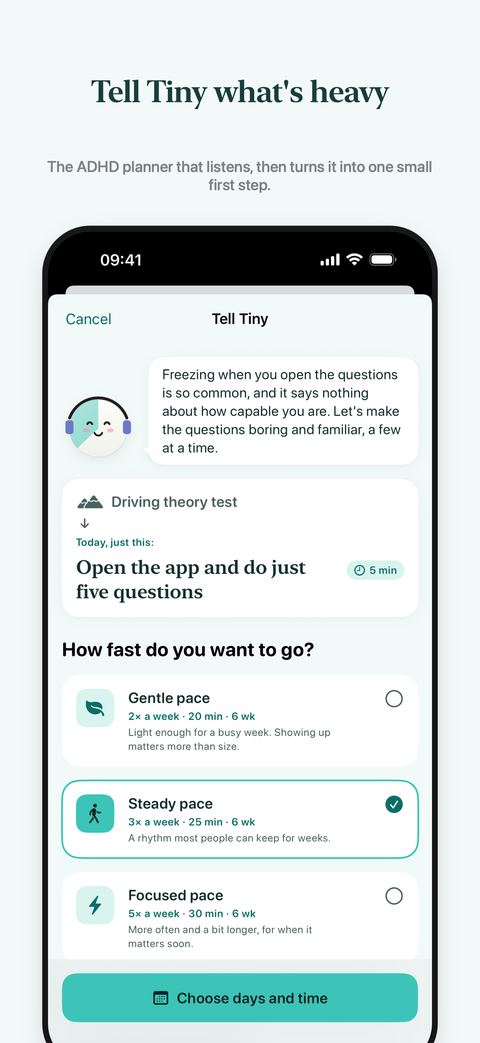
Tell Tiny screen: Tiny turns “Driving theory test” into one first step, “Open the app and do just five questions”, and offers a gentle, steady or focused pace.

Tinydo at a glance

What it is
An ADHD-friendly planner and focus app with AI task breakdown, a visual timer, routines, medication reminders, focus sounds and gentle follow-ups.
Who it’s for
People with ADHD (no diagnosis needed), students, parents and anyone who procrastinates or struggles to start.
Devices
iPhone and iPad with iOS or iPadOS 18 or later. Syncs through your private iCloud. There is no Android version.
Price
Free to download. Using the app requires a Tinydo Pro subscription (weekly, monthly or yearly); there is no free plan. The monthly plan includes a 3-day free trial for new subscribers.
Privacy
No account, no ads, no tracking. The AI is used only if you allow it.
Languages
30, including English, Spanish, Portuguese, French, German, Italian, Dutch, Turkish, Japanese, Korean and Chinese.
Made by
Gokche Tech, an independent developer in Turkey.

What Tinydo does

Tinydo is built around one idea: you don’t need a bigger list, you need the next small step and someone who checks in. Here is everything it does.

Tell Tiny: AI task breakdown for the thing you can’t start

Type or say what’s going on, the way you’d tell a friend: “the kitchen is a disaster”, “my exam is in June and I can’t open the books”, “I want to start running”. Tiny reflects it back and shrinks the mountain to today’s first step, usually 2 to 10 minutes long. Tell Tiny is a chat, so you can keep talking: Tiny remembers the conversation on your device and replies like a caring friend.

For bigger things, pick a pace (gentle, steady or focused), the days that fit your life and a time. Tiny lays out small sessions and only shows you what’s next. If AI is off or you’re offline, Tinydo still gives you simple built-in steps.

One step, one visual timer, made for time blindness

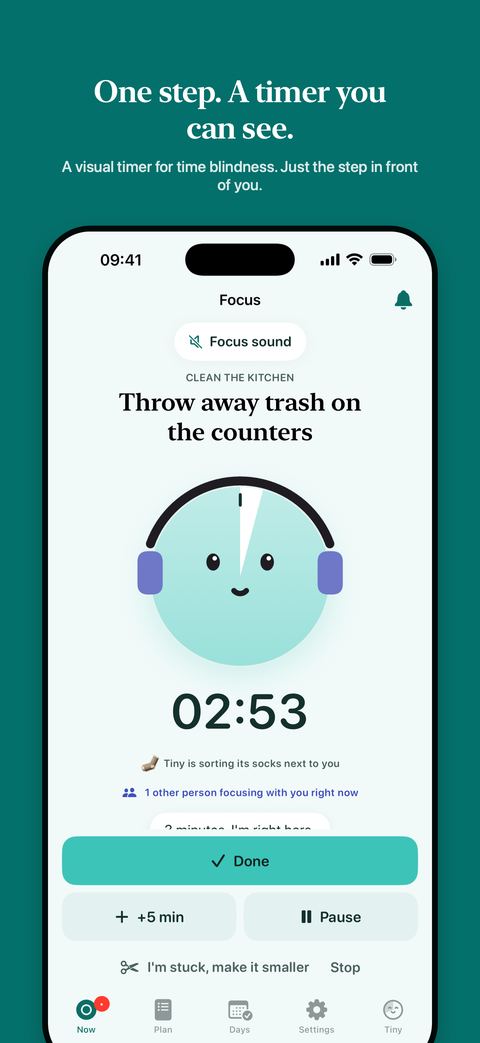
The Now screen shows one thing to do, not a list. Each step runs on a visual timer: the time left is a coloured wedge that shrinks toward 12 o’clock, so you can see time passing instead of reading numbers.

The timer also runs on your Lock Screen and in the Dynamic Island as a Live Activity. Stuck mid-step? Tap “I’m stuck, make it smaller” to split it into 1–3 minute micro-steps, or add 5 minutes. Tinydo also learns how long things really take you compared with your guess, and shows realistic times.

Focus screen with a visual timer at 2:53 for the step “Throw away trash on the counters”, a focus sound and a Done button.

Routines and a calm day plan

Build morning, evening and everyday routines with reminders on the days and at the times that suit you, or set a weekly target such as “any 3 days a week”. On iOS 26, routines can ring like an alarm.

The Plan tab puts routines, tasks, goal sessions and, if you allow it, your calendar on one timeline. Plan things for today, tomorrow, someday or an exact time, and add any task or study plan to your calendar.

Medication reminders that check in

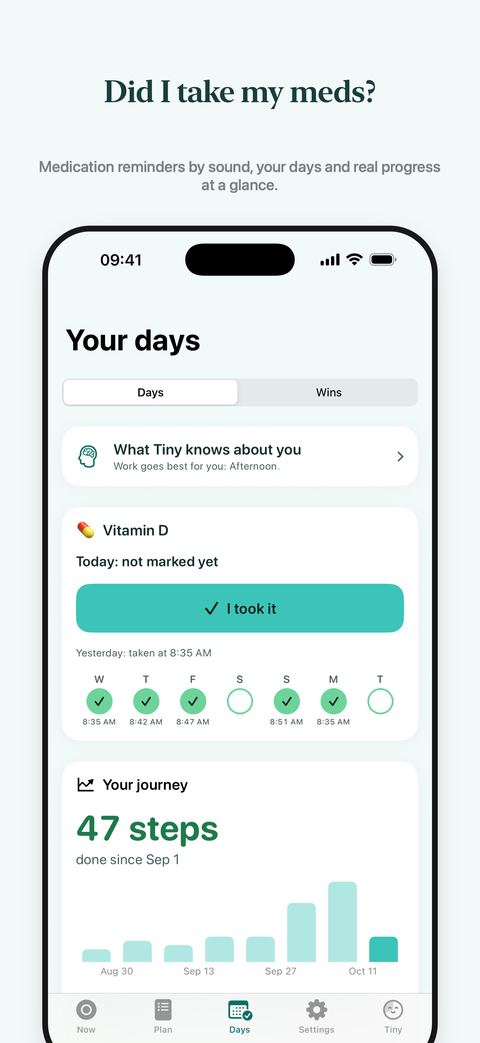
Set a reminder for your meds at the time you take them. Tap “I took it” right on the notification, or tell Siri “I took my medicine in Tinydo”. Each dose is saved with the time, and the meds card shows the last 7 days at a glance.

If a dose isn’t marked, Tiny asks again gently after 20 minutes and once more after an hour, then stops. By default the Lock Screen says “your medicine”, never its name. Medication reminders keep going even when you take a break from everything else. Tinydo only reminds you of the times you set; it gives no medical or dosing advice.

Days screen with a medication card: an “I took it” button and seven days of doses with the time each one was taken.

Focus sounds and reminders you recognise by ear

Play brown noise, pink noise, rain, ocean or fireplace while you work. Every reminder has its own sound made for Tinydo: a pill-bottle chime for meds, drops for water, a school bell for study, a doorbell for home. You know what it is before you look.

Body doubling, without a video call

While a step runs, Tiny visibly does its own small thing next to you: reading, knitting a tiny scarf, watering a plant. It shows on the Lock Screen too. You can also see an anonymous count of other Tinydo users focusing at the same moment, with no names, chat or camera. You can turn the count off in Settings.

If you leave the app mid-step, Tiny sends one check-in at halfway: “You’re doing it. I’m still here when you’re done.”

Gentle follow-ups when it doesn’t happen

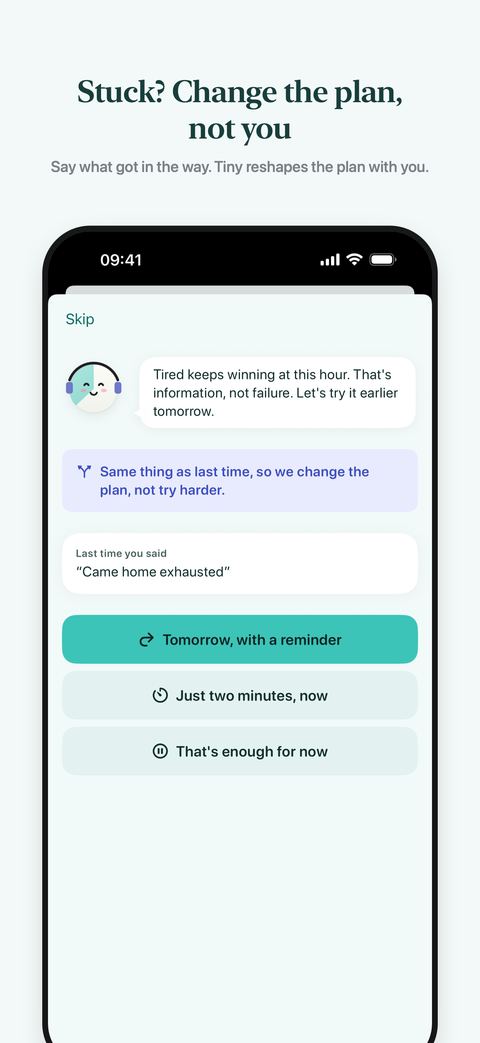
Stopped, skipped or moved to tomorrow? Tiny asks what got in the way: too big, no time, too tired, anxious, distracted, forgot. Each answer gets a real fix: much smaller, just two minutes, tomorrow with a reminder, or a focus sound. If the same thing keeps getting in the way, Tiny changes the plan instead of nagging.

Away for a few days? Tinydo opens with a warm welcome back and one 2-minute step, not a pile of overdue tasks. Need a break? Pause for 1 to 3 days: nothing counts as missed, your streak waits, and only medicine reminders continue. Tiny’s own notes come at most once a day and never between 21:30 and 08:00.

“What got in the way?” screen: Tiny notices the same thing as last time and offers “Tomorrow, with a reminder”, “Just two minutes, now” or “That’s enough for now”.

Study plans and exam countdowns

Add your exam date and Tiny plans light, regular study sessions with a countdown. After each session, close the book and jot down what you remember; the next session starts by recalling it. Recalling is how it sticks.

Insights: Tiny gets to know you, on your device

Tinydo notices the hours when you actually finish things, what keeps getting pushed back and which kind of help works for you, then suggests a better time for the hard stuff. “What Tiny knows about you” shows all of it in plain words, and one tap makes Tiny forget it. This learning happens on your device and is never sent to us or to the AI.

The Days tab shows what you did each day, your best runs and a calm 8-week chart. Numbers only grow: no red marks, no guilt. Patterns shows your best hour, your best day and week over week.

Widgets, Live Activities, Siri and Shortcuts

  • Home Screen and Lock Screen widget: your next routine, today’s wins and Tell Tiny in one tap
  • Live Activity on the Lock Screen and in the Dynamic Island while a step runs
  • Control Center controls: “Start next thing” and “Tell Tiny”
  • Siri and Shortcuts: start your next thing, tell Tiny, or mark your medicine as taken
  • iCloud sync between your iPhone and iPad
  • Six calm colour themes, Dark Mode, Dynamic Type, VoiceOver and Reduce Motion

Private by design

No account. No ads. No tracking. Your tasks, history and what Tiny learns about you stay on your device and in your private iCloud, which we can’t read.

Tiny’s AI only works if you allow it. Then what you tell Tiny is sent to our server and to Claude by Anthropic to answer you. We don’t store it, and it is never sold or used for ads. Say no, and Tinydo uses built-in steps and sends nothing to the AI. Anonymous usage statistics and crash reports, with no task text or names, help us fix the app; you can turn them off in Settings. Read the privacy policy.

Who Tinydo is for

Tinydo is for you if…

  • You have ADHD, diagnosed or not, and know what to do but can’t start
  • You’re a student with exams, assignments or a thesis to get through
  • You juggle meds, meals, the house and work, and things slip
  • You’re behind at work and keep avoiding the hard thing
  • You lose track of time and never know how long things take
  • You’re tired of to-do lists that only grow

It’s probably not for you if…

  • You need diagnosis, treatment or a crisis service. Tinydo is none of these.
  • You use Android. Tinydo is only on iPhone and iPad.
  • You want shared lists or team projects. Tinydo is personal.
  • You want a detailed calendar-first planner with every hour blocked out.

How Tinydo is different

  • It starts with what’s stuck, not with a calendar.You tell Tiny what’s heavy and get one first step. The lists live in the background.
  • It stays with you during the step.One visual timer, Tiny working alongside you, and a check-in at halfway.
  • It follows up and changes the plan.A miss leads to a smaller step or a better time, not a red list of overdue tasks.
  • It learns your patterns on your device.You can see everything it learned, in plain words, and erase it.
  • It is kind about breaks.Rest days don’t break your streak, and coming back starts with two minutes.
  • It respects your privacy.No account, no ads, no tracking, and AI only with your consent.

Pricing

Tinydo is free to download. To use it, you need a Tinydo Pro subscription, weekly, monthly or yearly; there is no free plan. New subscribers can try the monthly plan free for 3 days.

3-day free trial

Monthly plan, for new subscribers

  • Everything in Tinydo Pro
  • Chat with Tiny: up to 10 messages a day
  • Tiny reminds you before the trial ends (with notifications on)
  • Cancel at least 24 hours before it ends and you won’t be charged
  • Weekly and yearly have no trial and are billed from the start

Tinydo Pro

Weekly, monthly or yearly subscription

  • Chat with Tiny: up to 40 messages a day
  • Unlimited plans, routines and study plans
  • Visual timers, reminders, medication check-ins and focus sounds
  • Patterns: your best hour, best day and week over week
  • Widgets, Live Activities, Siri and iCloud sync

US prices: $4.99 a week, $14.99 a month or $49.99 a year. Prices in other countries are set by the App Store in your currency and shown in the app before you subscribe.

Payment is charged to your Apple Account. Subscriptions renew automatically unless cancelled at least 24 hours before the end of the current period. Cancel anytime in Settings > your name > Subscriptions.

Frequently asked questions

What is Tinydo?

Tinydo (App Store name “Tinydo: ADHD Planner & Focus”) is an iPhone and iPad app for people with ADHD and anyone who gets stuck starting things. You tell Tiny, the app’s friendly character, what’s going on; Tinydo breaks it into small steps, runs one step at a time on a visual timer and follows up gently if it doesn’t happen. It also has routines, medication reminders, focus sounds and study plans. It is made by Gokche Tech, an independent developer in Turkey.

Can Tinydo break down overwhelming tasks for ADHD?

Yes, that is its core. Type or say the task in your own words, for example “clean the kitchen” or “start my thesis”. With your permission, Tiny uses AI (Claude by Anthropic) to turn it into small steps of a few minutes each, easiest first, and shows only the first one. Big goals become a plan of short sessions on the days you choose. If a step still feels too big, “I’m stuck, make it smaller” splits it into 1–3 minute micro-steps. Without AI, Tinydo uses simple built-in steps. Tell Tiny is a chat, so you can keep talking: Tiny remembers the conversation on your device and replies like a caring friend.

Does Tinydo have a visual timer for time blindness?

Yes. Every step runs on a visual timer where the time left is a shrinking wedge, so you can see time pass at a glance. It also appears on the Lock Screen and in the Dynamic Island as a Live Activity. After a few finished steps, Tinydo compares how long things really take you with your guesses and shows more realistic times.

Can Tinydo remind me to take my ADHD medication?

Yes. Add a meds reminder at the time you take your medication; you can set it up the first time you open the app. Tap “I took it” on the notification or tell Siri. If a dose isn’t marked, Tiny checks in again after 20 minutes and after an hour, then stops. The Lock Screen says “your medicine” instead of its name unless you choose otherwise, and you can see the last 7 days of doses. Tinydo reminds you of the times you set; it does not give medical or dosing advice.

Is Tinydo a body doubling app?

It offers a solo kind of body doubling. While your timer runs, Tiny visibly does its own quiet activity next to you, such as reading or knitting, also on the Lock Screen. You can see an anonymous count of other Tinydo users focusing at the same moment, and Tiny sends one check-in at halfway if you leave the app. There are no video calls, chats or sessions with real people.

What happens if I miss a day or stop halfway?

Nothing turns red. Tiny asks what got in the way and offers a fix, such as a much smaller step, just two minutes, or tomorrow with a reminder. If the same reason keeps coming back, Tiny changes the plan. After a few days away, the app opens with one 2-minute step instead of a backlog. You can also take a 1–3 day break: nothing counts as missed and your streak waits.

Is Tinydo free? How much does Tinydo Pro cost?

Tinydo is free to download, but using it requires a Tinydo Pro subscription; there is no free plan. Choose weekly, monthly or yearly. The monthly plan includes a 3-day free trial for new subscribers, while weekly and yearly are billed from the start. During the trial Tiny answers up to 10 messages a day; with a paid subscription, up to 40 a day. In the US it costs $4.99 a week, $14.99 a month or $49.99 a year; local prices are shown in the app. Already subscribed? Tap “Restore purchases” on the subscription screen.

Does Tinydo need an account, show ads or track me?

No account, no ads and no tracking. Your tasks and history stay on your device and in your private iCloud. Tinydo sends anonymous usage events and crash reports, with no task text or names, to improve the app, and you can turn them off in Settings. Payments go through Apple, so the developer never sees your payment details.

What does Tinydo’s AI see, and can I use the app without AI?

The first time Tiny would use AI, the app asks you and lists what would be sent. If you agree, what you tell Tiny, the earlier messages of the same chat, short summaries of things you told it before, the struggles and hardest time of day you picked at the start, your language and today’s date go to Tinydo’s server and to Claude by Anthropic to write the answer. Tinydo doesn’t store it, Anthropic doesn’t train on it, and it is never sold. If you say no, Tinydo uses built-in steps and sends nothing to the AI. You can change this anytime in Settings → Privacy.

Is Tinydo a medical app? Do I need an ADHD diagnosis?

No to both. Tinydo is a planning and focus companion, not a medical device. It does not diagnose, treat or cure ADHD or any other condition, it is not a crisis service, and it does not replace professional care. You don’t need a diagnosis to use it, and the app never asks whether you have one. If you might hurt yourself or are in danger, call your local emergency number or find a helpline at findahelpline.com.

Which devices and languages does Tinydo support?

iPhone and iPad with iOS or iPadOS 18 or later; your data syncs between them through your private iCloud. There is no Android, Windows or web version. The app is available in 30 languages, including English, Spanish, Portuguese, French, German, Italian, Dutch, Turkish, Japanese, Korean and Chinese.

How do I cancel Tinydo Pro or the free trial?

Open the Settings app on your iPhone or iPad, tap your name, then Subscriptions, then Tinydo. You can also tap “Manage subscription” in Tinydo’s Settings. Cancel at least 24 hours before the trial or the current period ends to avoid the next charge. With notifications on, Tiny reminds you before your free trial ends. Refunds are handled by Apple at reportaproblem.apple.com.

Start with one tiny step

Tinydo is free to download on the App Store for iPhone and iPad; a Tinydo Pro subscription unlocks it, with a 3-day free trial on the monthly plan. No account, no ads, no tracking.

Download on the App Store